Apple MacBook Neo 13 Review: Best Single-Core Speed, Real Multi-Core LimitsApple MacBook Neo 13 Review: Best Single-Core Speed, Real Multi-Core LimitsApple MacBook Neo 13 Review: Best Single-Core Speed, Real Multi-Core LimitsApple MacBook Neo 13 Review: Best Single-Core Speed, Real Multi-Core Limits
July 23, 2026
The Apple MacBook Neo 13 arrives at $689.99 and immediately raises a question the company has not had to answer in a while: what exactly does a budget MacBook look like in practice? Our citrus review unit, that distinctive yellow-green aluminum that practically vibrates off the

The Apple MacBook Neo 13 arrives at $689.99 and immediately raises a question the company has not had to answer in a while: what exactly does a budget MacBook look like in practice? Our citrus review unit, that distinctive yellow-green aluminum that practically vibrates off the desk, is Apple's attempt to bring its A18 Pro silicon down to an accessible price without gutting the experience. In some respects it succeeds quietly and impressively. The chassis is unmistakably MacBook. The single-core CPU performance is, genuinely, class-leading at this price. The no-notch display is a small but real win. But spend a few days running real workloads and a different picture develops - one where multi-core tasks, file transfer speeds, and a keyboard missing its backlight chip away at what looked like a bargain. The MacBook Neo 13 is a real laptop, priced to reach new buyers, but it asks those buyers to compromise in ways that are harder to ignore the longer you live with it.
Quick Verdict
At $689.99, the MacBook Neo 13 is Apple's most accessible laptop and punches hard on single-core speed, build quality, and raw portability. The A18 Pro chip is genuinely fast for everyday tasks and the aluminum chassis feels premium at this price. However, multi-core performance places it last in its class, file transfer speeds trail significantly behind the MacBook Air, and the lack of a keyboard backlight is a harder pill to swallow than it sounds. Buy it for light daily work and portability. Skip it if you push workloads or type in the dark.
Ratings and Pros/Cons

| Aspect | Rating |
|---|---|
| Performance | 3/5 |
| Display | 4/5 |
| Design and Build | 4/5 |
| Keyboard and Trackpad | 3/5 |
| Ports and Connectivity | 2/5 |
| Value | 4/5 |
| Overall | 4/5 |
Pros
- Best-in-class single-core CPU performance at this price tier
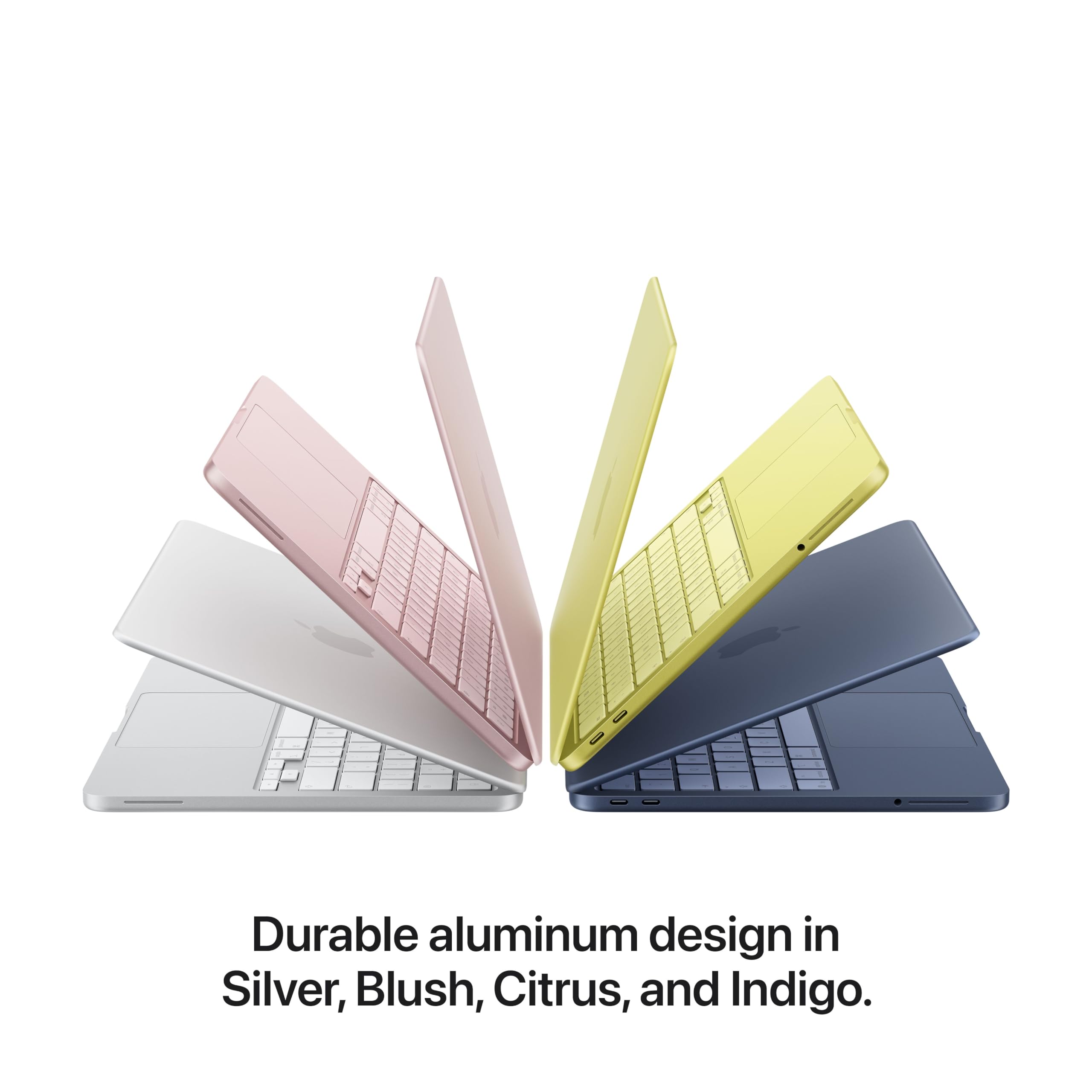
- Aluminum chassis, premium feel, four color options including distinctive citrus
- No notch: webcam sits cleanly in the bezel
- One-finger lid lift works reliably
- 2.7-pound weight with a footprint smaller than the 13-inch MacBook Air
- macOS folder accent colors automatically match chassis color
Cons
- Multi-core performance is last place against direct competitors
- No keyboard backlight at any price
- File transfer speeds significantly slower than the MacBook Air
- Port selection is thin and all ports sit on the left side only
- USB-C ports are unlabeled: macOS software notification required to identify them
- Smaller trackpad than MacBook Air or Pro
- No Thunderbolt, no USB-A, no HDMI, no SD card slot
Specs at a Glance
| Specification | Detail |
|---|---|
| Price | $689.99 |
| Chip | Apple A18 Pro, 6-core CPU (2 performance + 4 efficiency cores), 5-core GPU |
| RAM | 8GB |
| Display | 13.0-inch Liquid Retina LED IPS, 2408x1506 resolution, 60Hz |
| Ports | 1x USB-C 3 (10 Gb/s, DisplayPort), 1x USB-C 2 (480 Mb/s), 1x 3.5mm headphone jack (all on left side) |
| Keyboard | Color-matched keys, no backlight |
| Dimensions | 11.71 x 8.12 x 0.5 inches (297.5 x 206.4 x 12.7 mm) |
| Weight | 2.7 pounds |
| Chassis | Aluminum |
| Colors | Four options including indigo and citrus (yellow-green) |
| Webcam | Housed in bezel, no notch |
Display
The 13.0-inch Liquid Retina IPS panel on the MacBook Neo 13 runs at 2408x1506 and 60Hz, and the numbers tell a story that is more interesting in person than on paper. The resolution is sharp, text renders cleanly, and the IPS panel handles off-axis viewing the way you expect from Apple's display supply chain. What Apple has not given you here is ProMotion, meaning you are capped at 60Hz. For most daily tasks, document editing, light photo review, video calls, that ceiling is invisible. For anyone who has spent time on a 90Hz or 120Hz machine, the difference surfaces in scrolling.
The bigger story is the bezel, and here the MacBook Neo 13 earns a quiet win. The bezels around the panel are thicker than what you see on the MacBook Air and Pro. Apple has not trimmed them down to the same degree. But in exchange, there is no notch. The webcam sits cleanly inside the top bezel the way laptop webcams used to, which means the display is a clean uninterrupted rectangle. Whether that trade matters to you depends on how much the notch on the Air bothered you. On the Neo, the display looks conventional in the best sense: complete, uncluttered, easy to use with full-screen apps and tiling.
A detail Apple has carried through here is chassis color integration. The macOS accent color for folder icons automatically matches the color of the machine you are using. On our citrus unit, the folder icons in Finder adopted that yellow-green tone by default. It is a small touch but it speaks to how deliberately Apple has designed the product experience around the color story.
The port placement has a direct impact on how you relate to the display. Every port on the MacBook Neo 13 sits on the left side of the machine: the USB-C 3 port running at 10 Gb/s with DisplayPort support, the USB-C 2 port running at 480 Mb/s, and the 3.5mm headphone jack. There is nothing on the right side at all. For right-handed users whose workflow involves charging on the right or routing cables to the right of a desk, this is a constraint you adapt to rather than forget about.
In terms of physical footprint, the MacBook Neo 13 is slightly smaller than a 13-inch MacBook Air and 0.6mm taller. At 0.5 inches thick and 2.7 pounds, it sits in the same weight class as the Air while taking up a touch less desk space. The aluminum lid lifts open with one finger from a resting position, which sounds like a spec footnote until you are using it one-handed every day.
Performance
The Apple A18 Pro is a chip with a split personality, and the MacBook Neo 13 exposes both sides of it clearly. In single-core work, the processor is genuinely excellent at this price tier. In sustained multi-core workloads, it falls behind both of its primary competitors. Understanding which category your work falls into is the most important variable in deciding whether this machine is right for you.
In our Geekbench 6 single-core testing, the MacBook Neo 13 scored 3,535. That is meaningfully ahead of the M3 MacBook Air at 3,082 and significantly ahead of the Surface Laptop 13 at 2,486. For single-threaded tasks, everything from web browsing to light creative work to running most productivity software, the A18 Pro core architecture is the fastest option at this price. Apps open fast. The OS feels responsive. Day-to-day use has the snappiness you associate with Apple silicon.
The multi-core picture is the opposite. In Geekbench 6 multi-core, the MacBook Neo 13 scored 8,920. The Surface Laptop 13 scored 11,321. The M3 MacBook Air scored 12,087. The MacBook Neo is last place, and it is not close. The A18 Pro's configuration in this machine, two performance cores and four efficiency cores, does not scale up the way competing chips do under parallel loads. For tasks that push multiple cores simultaneously, this gap is real and reproducible.
Our Handbrake 4K-to-1080p transcode test put a concrete number on that gap. The MacBook Neo 13 completed the encode in 9 minutes and 57 seconds. The Surface Laptop 13 finished the same task in under 5 minutes. That is roughly twice the time for a representative sustained workload. If your workflow involves regular video processing, batch exports, or sustained compute tasks, the MacBook Neo 13 will feel slower than its price-tier competitors by a significant margin.
File transfer performance showed a similar gap. In our 25GB file transfer test, we measured 654.82 MBps on the MacBook Neo 13. The M3 MacBook Air turned in 1,167.29 MBps on the same test. The Air is moving data at nearly double the speed. For users who regularly work with large files, photo or video libraries, project folders, or disk images, that difference accumulates into meaningful time over the course of a workday.
Developers using Xcode should note our compile test result. The MacBook Neo 13 took 6 minutes and 47 seconds to complete the Xcode build we use in our standard suite. In our experience running this test across multiple machines, that is far more than what other Macs return. If you are an iOS or macOS developer who relies on this machine as your primary build system, compile times will be noticeably longer.
Our Cinebench 2026 run returned a score of 1,439, with the benchmark itself taking 14 minutes and 2 seconds to complete. That duration reflects the chip's sustained multi-core behavior under extended thermal load. The A18 Pro was not designed for this kind of workload and the numbers show it.
Benchmark Comparison
| Benchmark | MacBook Neo 13 (A18 Pro) | M3 MacBook Air | Surface Laptop 13 (Snapdragon X Plus) |
|---|---|---|---|
| Chip | Apple A18 Pro, 6-core | Apple M3, 8-core | Snapdragon X Plus, 8-core |
| Geekbench 6 Single-core | 3,535 (1st) | 3,082 | 2,486 |
| Geekbench 6 Multi-core | 8,920 (last) | 12,087 | 11,321 |
| Handbrake 4K to 1080p | 9 min 57 sec | n/a | Under 5 min |
| File Transfer (25GB) | 654.82 MBps | 1,167.29 MBps | n/a |
| Xcode Compile | 6 min 47 sec | Faster | n/a |
| Cinebench 2026 | 1,439 | n/a | n/a |
The summary: for anything that runs on one core, the MacBook Neo 13 is the fastest machine in its price class. For anything that uses all the cores at once, it is the slowest. That is an unusual split and it makes this machine very category-specific in a way most laptops are not.
Battery Life

Apple has not published a controlled battery life figure for the MacBook Neo 13, and we are not going to invent one. What we can say is that the A18 Pro was designed from the ground up for the iPhone's power envelope, where efficiency under constrained thermal and battery conditions is a primary engineering target. That lineage should work in this machine's favor during idle and light-load use.
In our day-to-day use across mixed tasks, browsing, document editing, video calls, and light media consumption, the machine handled a full day without reaching for the charger. That is a real-world observation, not a controlled benchmark, and your results will vary depending on display brightness, workload mix, and whether the efficiency cores are carrying the majority of your tasks or the performance cores are staying warm.
The A18 Pro's efficiency core architecture matters here more than the benchmark numbers alone suggest. The four efficiency cores in this chip handle sustained, lower-intensity work at dramatically reduced power draw compared to the two performance cores. For the tasks that dominate most laptops across a workday, email, video calls, web browsing, note-taking, those efficiency cores are doing the heavy lifting and the battery benefits from it.
Where the battery story gets more complicated is under sustained multi-core load. The same workloads that exposed the MacBook Neo 13's weaknesses in our benchmarks, extended video encodes, large Xcode builds, anything that keeps all six cores simultaneously active, will compress battery life more aggressively than light mixed use does.
Charging is via the USB-C ports, which is standard at this point, but the absence of a dedicated MagSafe connector means you are losing one of your two USB-C ports to the charger whenever the machine is plugged in. With only two USB-C ports to begin with, that is a constraint worth naming in how you plan your desk setup.
The honest caveat is that we are working from informed extrapolation for sustained-load scenarios rather than a timed drain test, and we are telling you that explicitly rather than presenting a number we do not have. Buyers who need a guaranteed all-day battery estimate should wait for more controlled testing data before deciding.
Keyboard, Trackpad and Ports
The keyboard on the MacBook Neo 13 has color-matched keys, a genuine design achievement that photographs beautifully and reads as intentional rather than novelty. On our citrus unit, the keys carry that same yellow-green tone as the chassis and the overall effect is cohesive. The typing experience itself is solid, with the consistent key action Apple has delivered on its laptop keyboards for several generations.
There is no backlight. That sentence needs its own space because the implications are wider than they first appear. Apple has not included an illuminated keyboard at $689.99, which means typing in any low-light environment requires memorized key positions or an external light source. For users who work primarily at a well-lit desk, this is a mild inconvenience at worst. For anyone who types on planes, in hotel rooms at night, in coffee shops with uneven lighting, or in bed, the absence is felt every session. This is a deliberate cost reduction decision, clearly documented, but it is the single feature omission that will irritate the most people the most consistently.
The trackpad is smaller than what you find on the MacBook Air and significantly smaller than the MacBook Pro. The size difference is noticeable if you switch between machines regularly. Precision gestures still work correctly and macOS trackpad input is as smooth as expected, but users with larger hands or who rely heavily on wide-arc trackpad gestures will feel the reduced surface.
Ports: everything is on the left side. You get one USB-C 3 port running at 10 Gb/s with DisplayPort support, one USB-C 2 port running at 480 Mb/s, and one 3.5mm headphone jack. There is no Thunderbolt, no USB-A, no HDMI, and no SD card slot. The USB-C 2 port's 480 Mb/s ceiling is a real limitation for anything involving fast external storage or high-bandwidth peripherals. It is a port speed that belongs to a previous generation and it shows.
The unlabeled ports are a separate frustration. The two USB-C ports are physically identical on the chassis. There is no marking, no engraving, no indicator to distinguish the 10 Gb/s port from the 480 Mb/s port without looking it up. macOS surfaces a software notification when you plug something in, identifying which port you are using, which is a clunky workaround for what is fundamentally a labeling problem. The cognitive load of managing unlabeled ports belongs on the hardware, not on the user.
Value for Money

At $689.99, the MacBook Neo 13 enters at a price Apple has not historically occupied for a laptop with this build quality. The aluminum chassis, A18 Pro chip, and macOS ecosystem at this price point represent a real offer. Compared to the M3 MacBook Air, priced at a meaningful premium above this, you are giving up Thunderbolt, a backlit keyboard, a larger trackpad, and significantly faster sustained performance. Compared to the Surface Laptop 13 in a similar price tier, you are giving up multi-core speed and faster encode times while gaining macOS, class-leading single-core performance, and the aluminum build story. The value equation holds specifically if your workloads match the chip's strengths.
Who Should (and Should Not) Buy This
Buy it if you want your first Mac at an accessible price, you work primarily in single-threaded applications, your daily workload is browsing, documents, video calls, and light creative work, portability at 2.7 pounds matters, and you type in well-lit environments. Students, casual home users, and anyone upgrading from an older Intel Mac will find the A18 Pro's day-to-day responsiveness impressive.
Skip it if you encode video regularly, compile code for a living, move large files frequently, type in low-light conditions, or rely on Thunderbolt, USB-A, HDMI, or SD card connectivity. Those users should look seriously at the M3 MacBook Air at a higher price point, or evaluate whether the Surface Laptop 13 in a similar price tier better matches their workload profile.
Bottom Line

The MacBook Neo 13 at $689.99 is a focused machine with real strengths and real limits. Single-core speed is best in class. The build is premium. The no-notch display is a clean, complete panel. But the multi-core benchmarks put it last in its class, file transfer speeds trail significantly, and the missing keyboard backlight is a daily reminder of where costs were cut. Buy it with eyes open: this is the right MacBook for light workloads and the wrong one for power users.
The MacBook Neo 13 represents something Apple rarely does: a price-point bet. The company is wagering that the combination of aluminum build quality, macOS polish, and single-core speed leadership can satisfy a new category of buyer who previously looked elsewhere. For many of those buyers, that bet will pay off. The ones who discover the missing backlight on their first red-eye flight will have mixed feelings about it.
-- Theo Chan, Hardware Testing Director
*Disclosure: As an Amazon Associate, Revuzia earns from qualifying purchases. Prices and availability are accurate as of publication and may change.*